 English
English
English
 English
Your online visa application is now complete and ready to be submitted to the US authorities. To see and review your data, please follow the instructions below:
1. Have the application ID provided to you by your consultant ready. Application IDs consist of a ten-digit combination of numbers and letters, beginning with AA00. You will also need your passport or passport number, as you will be required to enter it again at the end of the submission process.
2. Open the website https://ceac.state.gov/genniv/ in your web browser.
Note: Due to technical issues with the official DS-160 website, there may be sudden disconnections. In such cases, you can simply log in again on the start page and continue from where you left off.
The following browsers are best suited for submitting the DS-160:
Unfortunately, Safari and Microsoft Edge produce display errors.
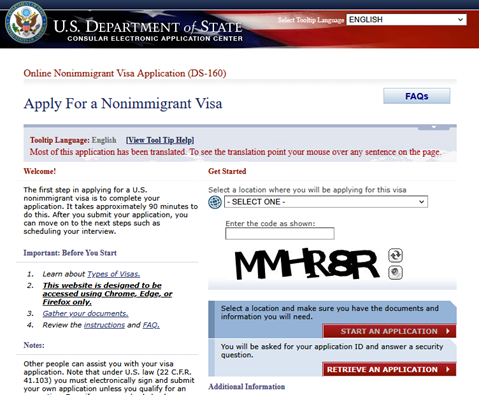
3. Zum Abruf Ihrer Daten können Sie unter "select a location" das zutreffende Konsulat auswählen, Sie können die Auswahl aber auch leer lassen. Die Daten lassen sich auch ohne Ortsauswahl abrufen. Geben Sie dann den sichtbaren Sicherheitscode ein und klicken Sie anschließend im unteren Bereich auf "Retrieve an Application".
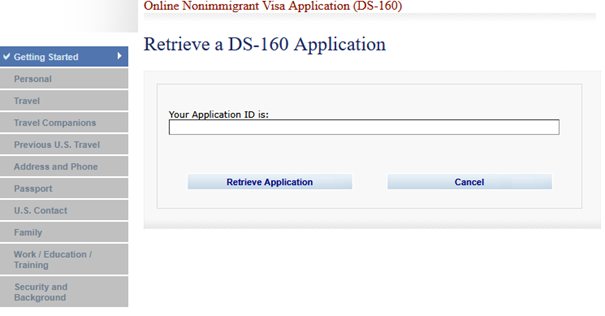
4. Geben Sie nun Ihre Application ID an und klicken Sie anschließend wieder "Retrieve Application".
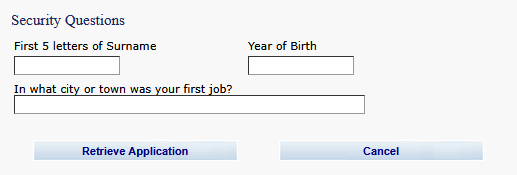
5. In the following section, three short questions will be generated to authenticate your data record.
Please enter the first five letters of your last name and your year of birth.
In the field “In what city or town was your first job?”, please enter BERLIN, even if this may not correspond to the location of your first employment. This information is a standardized response and is not part of your application. It is only used to authenticate your data.
Then click “Retrieve Application” again.
Note: Please enter ä = ae, ö = oe, ü = ue and ß = ss!
If your name consists of multiple parts, e.g. de Marquell, enter "DE MA" here. The space is treated as a letter by the system.
6. After retrieving your data, please click on the tab "REVIEW" at the top.
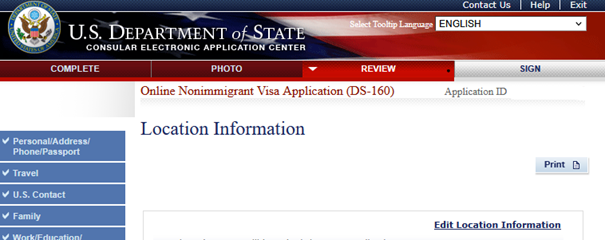
7. Now you have the opportunity to review your data again before submitting it. If you wish to make changes to the information in the form, please do not make them yourself; instead, please contact us again beforehand. Once the form has been submitted, no further changes can be made.
Please click on “Next:...” at the bottom of each page until you reach the “Sign and Submit” section.
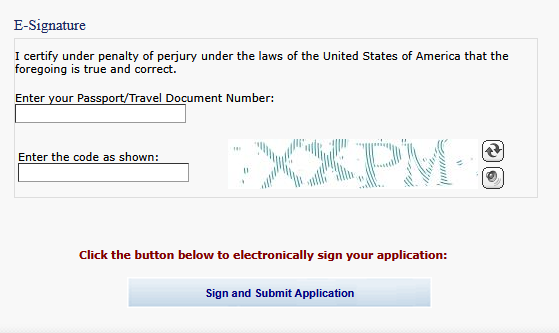
8. At the bottom of the page, under "Preparer of Application", you will find the question as to whether someone has helped you prepare the application. We have already filled in our data here, so you only need to enter your passport number and the automatically generated security code under E-Signature.
Then click "Sign and Submit Application" to submit your DS-160 form to the US authorities.
9. As a final step, you can click “Next: Confirmation” to download the submission confirmation via “Print Confirmation.” However, since we will also retrieve the confirmation, you do not necessarily have to download or save the document. You can also exit the application directly by clicking “Exit” in the upper right-hand corner after submitting.
Please let us know once you you have completed the submission. Thank you!
Wir und unsere Partner nutzen Cookies, um personenbezogene Daten wie z.B. Browsing-Daten zu speichern und abzurufen, um z.B. Inhalte und Werbung bereitzustellen und zu personalisieren sowie die Verwendung der Website zu analysieren und das Benutzererlebnis zu verbessern. Sie erfahren mehr über die Zwecke, für welche wir und unsere Partner Cookies einsetzen, wenn Sie unten auf den Button „Cookie Einstellungen“ klicken. Hier können sämtliche Einstellungen auch geändert werden. Nachträglich kann man jederzeit seine Cookie-Auswahl überdenken oder seine Einwilligung widerrufen, indem man auf den Link zu den Cookie-Einstellungen im Footer unserer Webseite klickt. Beachten Sie bitte, dass das Blockieren einiger Cookie-Typen unsere Möglichkeiten zur Bereitstellung von auf Ihre Interessen zugeschnittenen Inhalten haben kann oder einige Funktionen der Webseite nur eingeschränkt zur Verfügung stehen.
Durch klicken auf “Alle Cookies akzeptieren” stimmen Sie unserer Nutzung und der Weitergabe Ihrer Daten an unsere Partner zu.